



原理:把公钥放置:~/.ssh/authorized_keys
#准备工作
useradd test  //先创建用户
id test        //检查
echo 123456|passwd --stdin test        //非交互式设置密码
su - test
whoami

#开始部署
A(中心服务器):
ssh-keygen -t dsa  //生成密钥 ,一路回车
ssh-copy-id -i .ssh/id_dsa.pub  "-p 22 test@192.168.1.10"     //分发公钥

#验证
ssh -p22 test@192.168.1.10

ssh -p22 test@192.168.1.10 /sbin/ifconfig

#脚本批量分发

for n in 8 9
do
    scp -P22 $1 192.168.1.$n:~
done

fenfa.sh

sh   fenfa.sh  /etc/a.txt
批复制分发文件脚本1
#!/bin/sh

file="$1"
remotedir="$2"
. /etc/init.d/functions

if [$# -ne 2]
    then
    echo "USAGE:/bin/sh $0 arg1 arg2"
    exit 1
fi

for n in 10 11 12 13 14 15
do
    scp -p22 -rp $file qinzc@192.168.1.$n:$remotedir>/dev/null 2>&1
    if [ $? -eq 0 ]
     then
         action "scp $file to $remotedir is ok" /bin/true
     else
         action "scp $file to $remotedir is fail" /bin/false
    fi
done
批量执行命令
#!/bin/sh
. /etc/init.d/functions

if [$# -ne 1]
    then
    echo "USAGE:/bin/sh $0 arg1 "
    exit 1
fi

for n in 10 11 12 13 14 15
do
    ssh -p22 qinzc@192.168.1.$n $1
    if [ $? -eq 0 ]
     then
         action "======================== ok =======================" /bin/true
     else
         action "======================== fail =======================" /bin/false
    fi
done
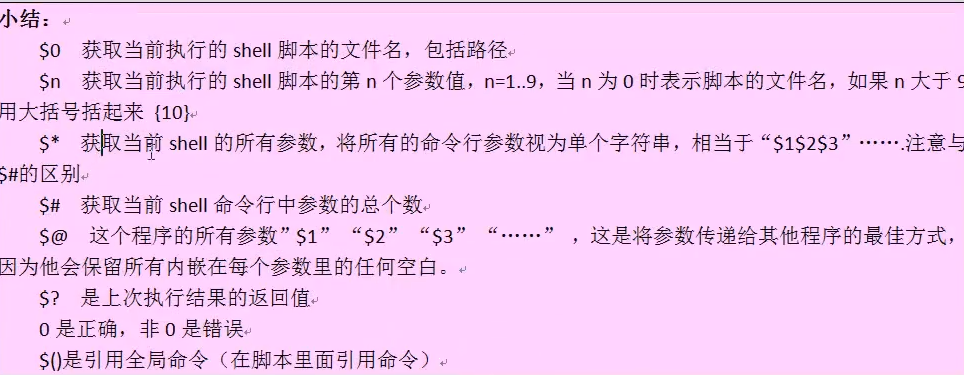
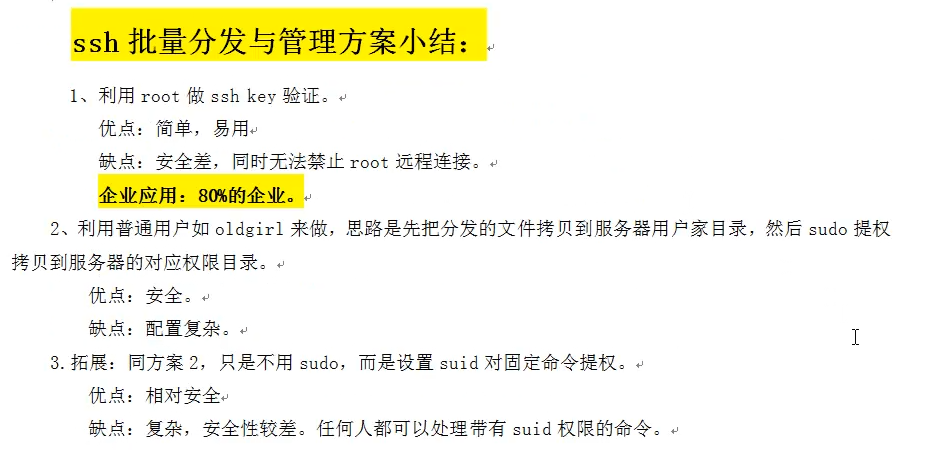
批量复制到/etc下无权限问题,解决方法
#方法1
在 visudo 增加 cp 的使用权限

test    ALL=(All)       NOPASSWD: /bin/cp

sudo -l   //测试是否已拥有root 使用cp 的权限

visudo -c  //测试解析是否正确

==============================================================================================

#!/bin/sh
file="$1"
remotedir="$2"
. /etc/init.d/functions

if [$# -ne 2]      //-ne  不等于
    then
    echo "USAGE:/bin/sh $0 arg1 arg2"
    exit 1
fi

for n in 8 9
do
    scp -p22 -rp $file test@10.10.0.$n:~>/dev/null 2>&1  &&\    // 这行成功执行下一行
    scp -p22 -t test@10.10.0.$n sudo /bin/cp ~/$file $remotedir >&>/dev/null
    if [ $? -wq 0 ]     //判断前边是否执行正确
     then
         action "scp $file to $remotedir is ok" /bin/true
     else
         action "scp $file to $remotedir is fail" /bin/false
    fi
done
#方法2
所有机器root权限下增加命令的SUID
chmod 4755 /usr/bin/rsync   // 4表示增加此命令SUID

==============================================================================================
#!/bin/sh
file="$1"
remotedir="$2"
. /etc/init.d/functions

if [$# -ne 2]      //-ne  不等于
    then
    echo "USAGE:/bin/sh $0 arg1 arg2"
    exit 1
fi

for n in 8 9
do
    ssh -p22 -rp $file test@10.10.0.$n:~>/dev/null 2>&1  &&\    // 这行成功执行下一行
    ssh -p22 test@10.10.0.$n /usr/bin/rsync ~/$file $remotedir >&>/dev/null
    if [ $? -wq 0 ]     //判断前边是否执行正确
     then
         action "scp $file to $remotedir is ok" /bin/true
     else
         action "scp $file to $remotedir is fail" /bin/false
    fi
done
Expect 非交互批量分发,脚本
expect.exp
#!/usr/bin/expect
if { $argc !=2} {
send_user "usage: expect expect.exp file host\n "
exit
}

set file [lindex $argv 0]
set host [lindex $argv 1]
set password "666666"

spawn ssh-copy-id -i $file "-p 22 root@$host"
expect {
        "yes/no"        {send "yes\r";exp_continue}
        "*password" {send "$password\r"}
}
expect eof

exit -onexit {
  send_user "Oldboy say good bye to you!\n"
}

#script usage
#expect oldboy-6.exp file host dir
#example
#./oldboy-6.exp /etc/hosts 10.0.0.179 /etc/hosts
批量分发密钥
#!/bin/sh
. /etc/init.d/functions

for ip in 10 11 15 16
do
    expect expect.exp ~/.ssh/id_dsa.pub 192.168.1.$ip
done







 桂ICP备16010384号-1
停留在世界边缘,与之惜别